
Lispa for Construction & field services

From the site to the screen.
Keep the details together.

Field reports, drawing revisions, and contractor portals bring practical software problems. Ask Lispa to investigate one workflow and return a change with checks you can review.

See plans and usage charges
Lispa egg agents illustrate bring the site update back for construction & field services.
Works with
  • Claude
  • Codex
  • Grok
  • Gemini
  • Open models
From your backlog to a clear brief

Three useful places to start.

Use demo projects, sample drawings, and synthetic contractors. Define offline sync and document revision behavior in the brief.

01 / Suggested task

Bring an offline report back.

A phone reconnects after a field update and uploads the same photo twice. Replay the sync sequence with sample reports.

Ask for

A reproducible sync test and a fix for the agreed merge behavior.

Use this starter prompt
MAKE IT YOURS

Reproduce [offline field-report issue] in [repository] using demo projects and sample photos. Test disconnect, reconnect, repeated upload, conflicting edits, and interrupted sync. Follow [merge rules], add regressions, and inspect the phone flow. Do not submit real site reports or deploy.

See the full workflow →
02 / Suggested task

Show the right drawing revision.

A document list hides which version is current. Add a revision view that keeps the history easy to inspect.

Ask for

A document view with revision, missing-file, and permission tests.

Use this starter prompt
MAKE IT YOURS

Build [drawing revision view] in [repository] using sample files and demo project roles. Show current and previous revisions, missing files, and access-denied states according to [document rules]. Test sorting, linking, and tablet layout; provide screenshots and test results. Do not interpret structural drawings or change live documents.

See the full workflow →
03 / Suggested task

Check the contractor portal.

A contractor switches projects and sees the wrong attachment list. Trace the project boundary in both the UI and API.

Ask for

Project-isolation tests, a focused fix, and stated coverage gaps.

Use this starter prompt
MAKE IT YOURS

Review [contractor portal feature] in [repository] with two demo projects and synthetic contractor roles. Check UI and server access, project switching, cached lists, and attachment links against [access matrix]. Fix [reported defect], run regressions, and report untested paths. Do not use real project records or claim a full security audit.

See the full workflow →

Suggested engineering workflows, not customer case studies. Adapt the brief and review the result with your team.

Inside Lispa / Tasks & bug fixes

Follow the separate fixes and checks in a field-software task.

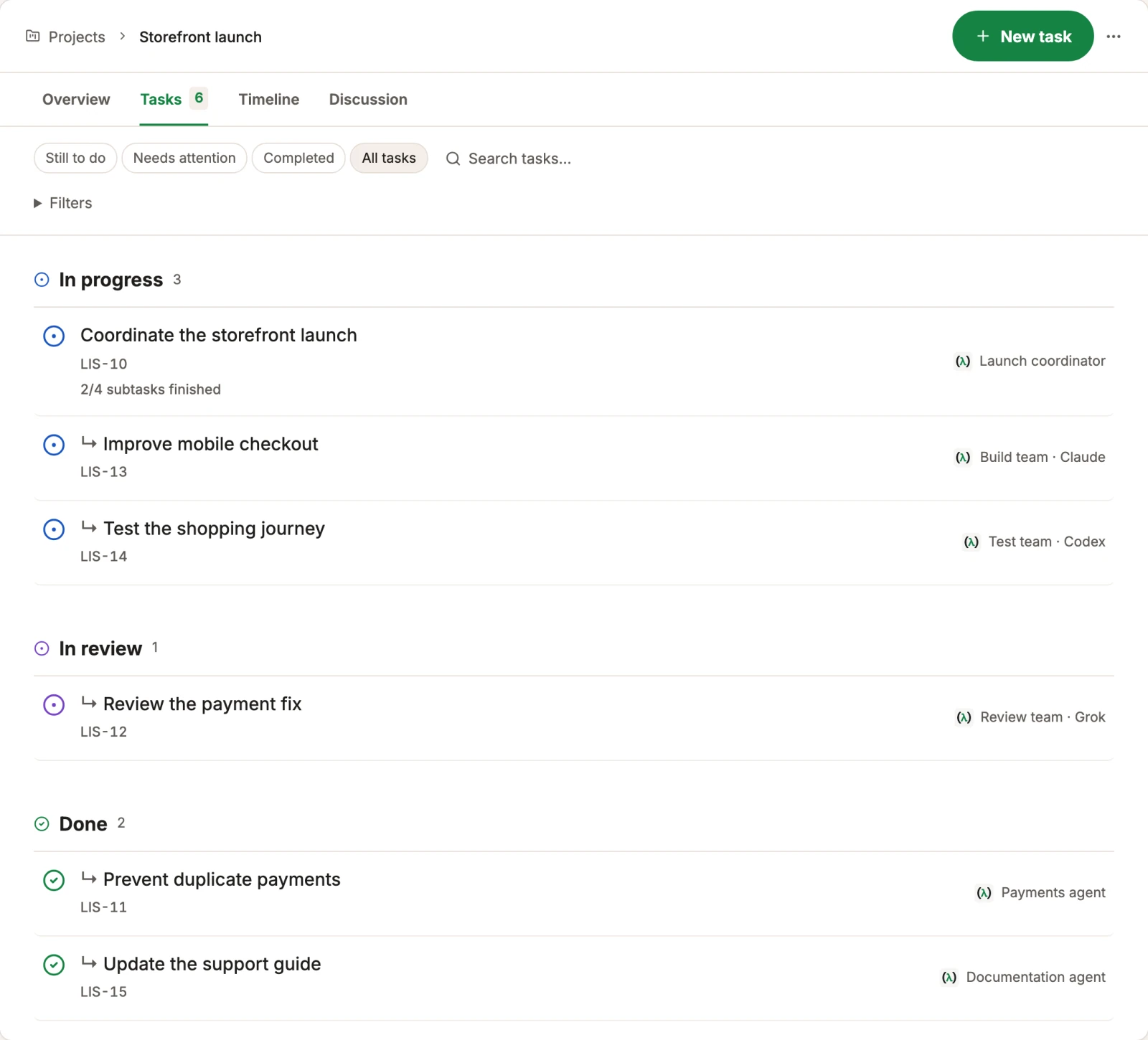
Break a broad request into focused tasks. Keep dependencies, active work, and results in view while agents investigate bugs or work through failing checks.

Explore tasks & bug fixes →
Lispa egg agents illustrate bring the site update back for construction & field services.
Works with
  • Claude
  • Codex
  • Grok
  • Gemini
  • Open models
Actual Lispa task list grouped by progress, review and completion with fictional tasks.
Actual Lispa interface · Fictional demo data · Shared product exampleView full size ↗
Inside Lispa / The shared brain

Keep the project conventions available for the next change.

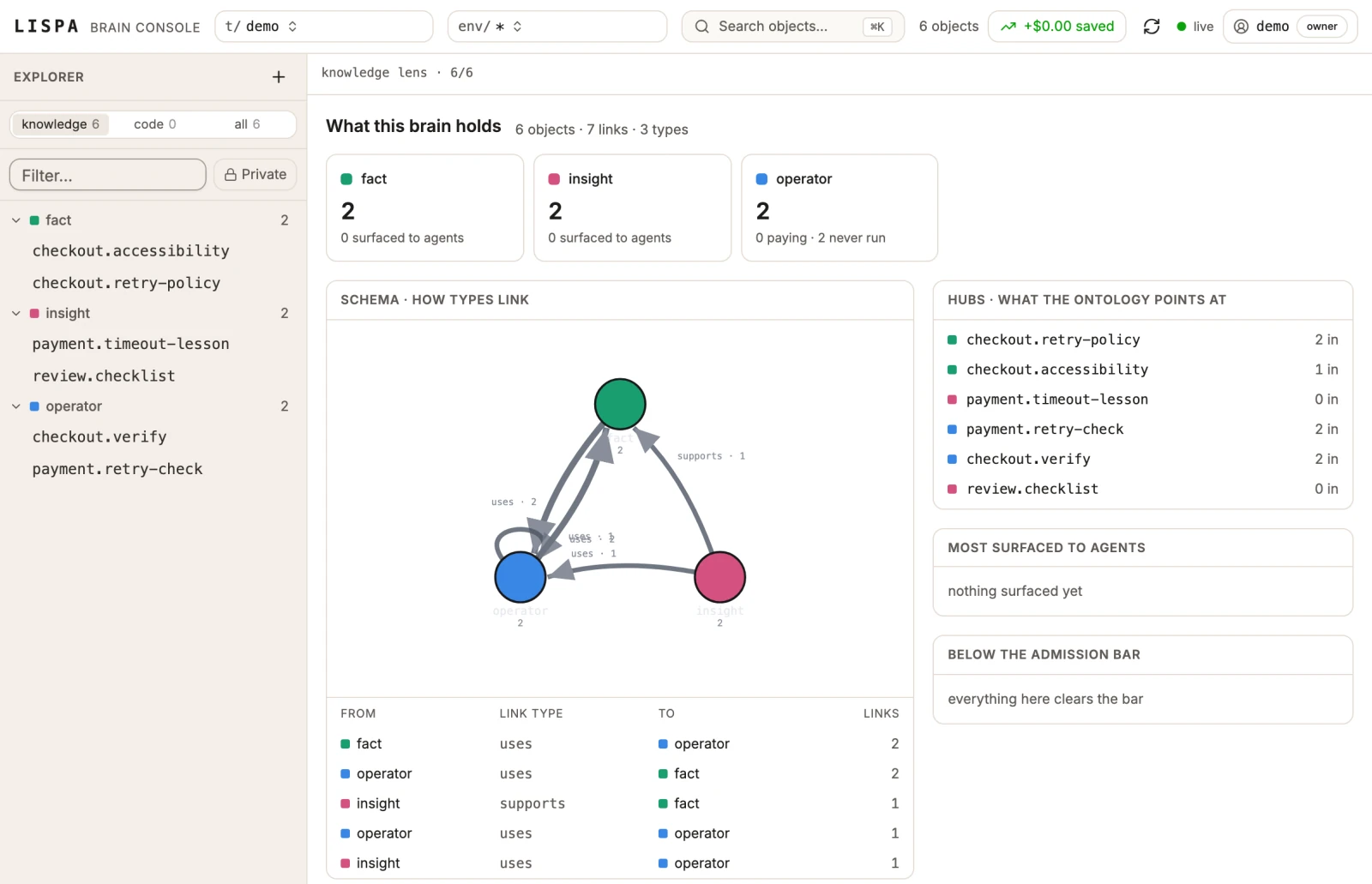
Keep repository facts, lessons, and reusable commands connected. Let the next piece of work start with what the team has already learned.

Explore the shared brain →
Lispa egg agents illustrate every revision in its place for construction & field services.
Works with
  • Claude
  • Codex
  • Grok
  • Gemini
  • Open models
Actual Lispa brain view with fictional repository facts, lessons, operators and their relationships.
Actual Lispa interface · Fictional demo data · Shared product exampleView full size ↗
A place for the next task, too

Keep the useful work close.

Reuse your repository rules, inspect model usage, and leave useful knowledge for the next agent. The workspace stays connected as the work changes.

Take the full product walkthrough →
Bring one piece of real work

A clear goal.
A result you can review.

Connect a repository and start with a focused task.
Set the checks and permissions in your brief.

Start with Lispa →

Paid plan required to run tasks. View current plans and charges.

Explore all 16 industries →