
Lispa for Energy & utilities

Useful data.
Working service tools.

Meter imports, service portals, and field dashboards all create software work. Give Lispa a testable slice and inspect the code, checks, and open questions together.

See plans and usage charges
Lispa egg agents illustrate make meter data make sense for energy & utilities.
Works with
  • Claude
  • Codex
  • Grok
  • Gemini
  • Open models
From your backlog to a clear brief

Three useful places to start.

Use simulated readings and a staging portal. State units, timestamp conventions, and missing-data behavior in the engineering brief.

01 / Suggested task

Catch gaps in meter data.

A reading arrives late, repeats, or uses an unexpected unit. Test the ingestion boundary with a small synthetic stream.

Ask for

Validation tests and a report that distinguishes missing and rejected readings.

Use this starter prompt
MAKE IT YOURS

Test [meter ingestion module] in [repository] with simulated readings. Cover duplicates, late arrivals, unit mismatches, missing intervals, and daylight-saving transitions. Implement [agreed validation behavior], run focused regressions, and report gaps. Do not connect to operational meters, control equipment, or deploy.

See the full workflow →
02 / Suggested task

Make the service request clear.

A customer cannot tell whether a form was received. Improve the pending, failed, and completed states in staging.

Ask for

A focused portal change with desktop and phone evidence.

Use this starter prompt
MAKE IT YOURS

Inspect [service request flow] in [staging portal] with synthetic accounts. Check validation, interrupted submissions, retries, status messages, keyboard access, and desktop and phone layouts. Fix [specific issue], run browser checks, and attach screenshots. Do not submit live service requests or deploy.

See the full workflow →
03 / Suggested task

Build a field-work dashboard.

A supervisor needs to see which test jobs are waiting on a dependency. Add a view that explains the status.

Ask for

A reviewable view with seeded data and tested filtering.

Use this starter prompt
MAKE IT YOURS

Build [field-work dashboard view] in [repository] using synthetic jobs and mocked APIs. Reuse the design system, show blocked and unknown states, and test filtering and pagination. Verify desktop and tablet layouts and provide screenshots. Do not issue work orders or connect to operational control systems.

See the full workflow →

Suggested engineering workflows, not customer case studies. Adapt the brief and review the result with your team.

Inside Lispa / Projects & releases

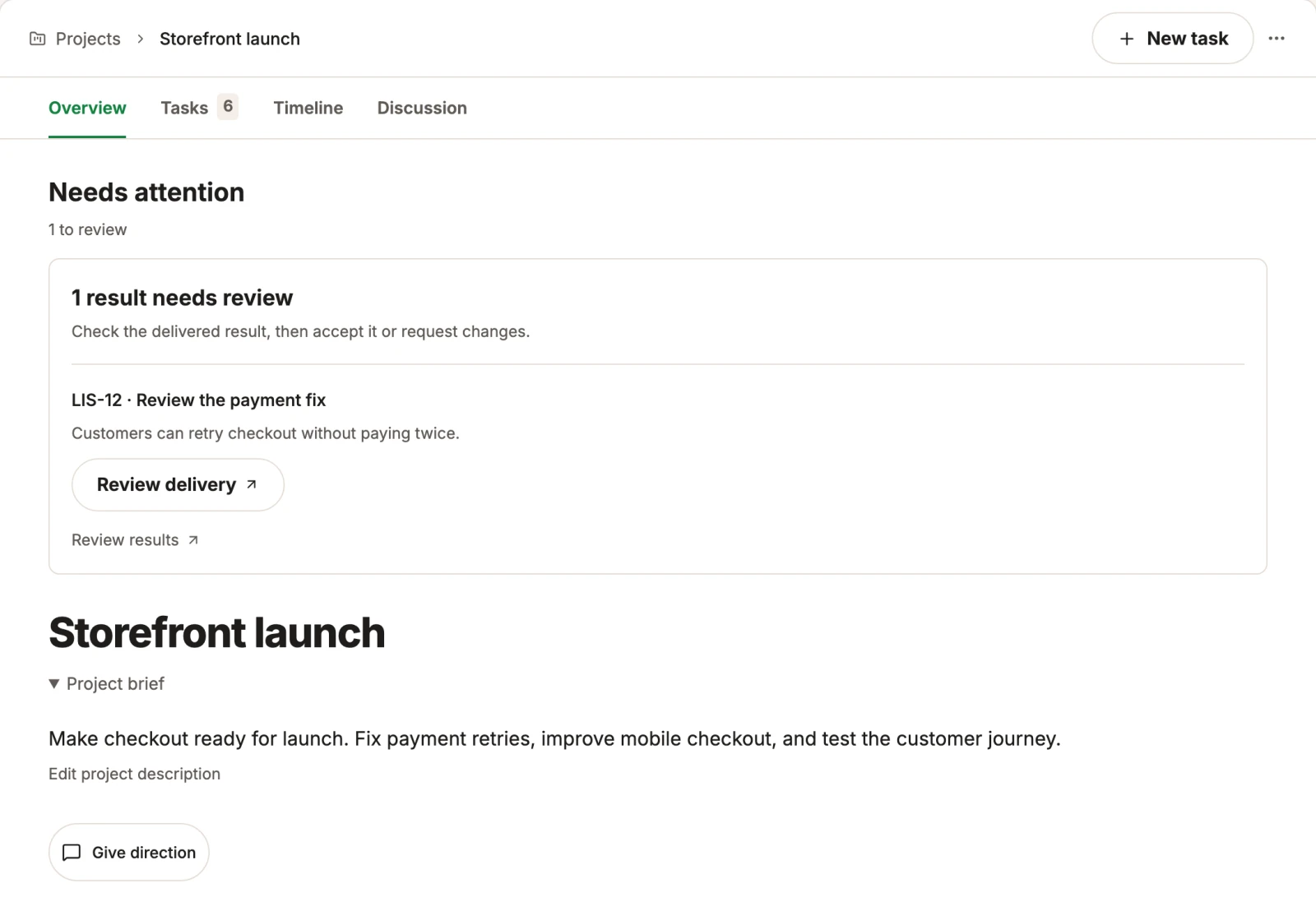
Keep the data contract and acceptance checks with the project.

A release has a brief, a pile of fixes, and evidence to collect. Keep them in one project. See what changed, what is still running, and where Lispa needs your decision.

Explore projects & releases →
Lispa egg agents illustrate make meter data make sense for energy & utilities.
Works with
  • Claude
  • Codex
  • Grok
  • Gemini
  • Open models
Actual Lispa project overview with a fictional storefront launch, remaining work and results.
Actual Lispa interface · Fictional demo data · Shared product exampleView full size ↗
Inside Lispa / The shared brain

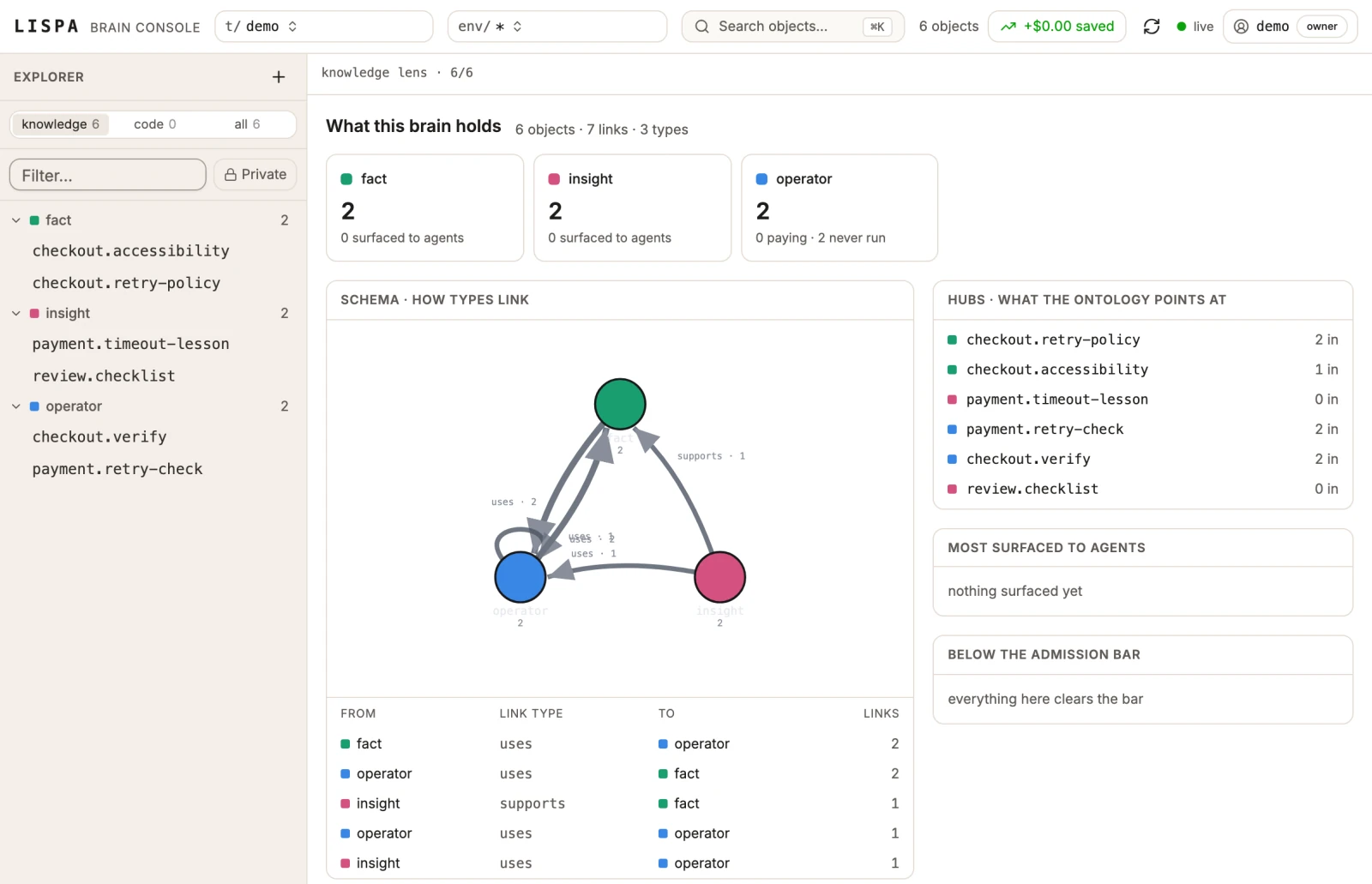
Save the units and timestamp conventions the next task will need.

Keep repository facts, lessons, and reusable commands connected. Let the next piece of work start with what the team has already learned.

Explore the shared brain →
Lispa egg agents illustrate a clearer service view for energy & utilities.
Works with
  • Claude
  • Codex
  • Grok
  • Gemini
  • Open models
Actual Lispa brain view with fictional repository facts, lessons, operators and their relationships.
Actual Lispa interface · Fictional demo data · Shared product exampleView full size ↗
A place for the next task, too

Keep the useful work close.

Reuse your repository rules, inspect model usage, and leave useful knowledge for the next agent. The workspace stays connected as the work changes.

Take the full product walkthrough →
Bring one piece of real work

A clear goal.
A result you can review.

Connect a repository and start with a focused task.
Set the checks and permissions in your brief.

Start with Lispa →

Paid plan required to run tasks. View current plans and charges.

Explore all 16 industries →