
Lispa for Logistics & operations

Every handoff counts.
Make the software follow.

Dispatch dashboards and warehouse integrations have a lot of moving parts. Give Lispa one integration bug or operational improvement, with test events and a result to check.

See plans and usage charges
Lispa egg agents illustrate follow the handoff for logistics & operations.
Works with
  • Claude
  • Codex
  • Grok
  • Gemini
  • Open models
From your backlog to a clear brief

Three useful places to start.

Use synthetic shipments and mocked carrier responses. State which operational systems are test-only and which actions require approval.

01 / Suggested task

Handle events out of order.

A delivery update arrives before a pickup update. Reproduce the sequence and test the state machine.

Ask for

Event fixtures, transition tests, and an explanation of the fix.

Use this starter prompt
MAKE IT YOURS

Reproduce [shipment state issue] in [repository] with synthetic carrier events. Test duplicates, delayed messages, missing events, and time-zone boundaries. Implement the agreed transition rules and run regression tests. Do not send requests to live carriers or deploy.

See the full workflow →
02 / Suggested task

Improve the dispatch view.

An operator needs a clearer filter or exception state. Build it with the existing components and check the real browser flow.

Ask for

A working dashboard change with loading, empty, and error states.

Use this starter prompt
MAKE IT YOURS

Implement [dispatch dashboard improvement] in [repository] with synthetic shipment data. Reuse existing components and check filters, pagination, empty results, and errors. Verify desktop and tablet layouts and attach screenshots. Do not update live shipments, merge, or deploy.

See the full workflow →
03 / Suggested task

Give adapters a regular check.

A vendor payload changes and an adapter falls behind. Schedule the fixture tests and surface failures with context.

Ask for

A scoped routine that reports failing contracts and test output.

Use this starter prompt
MAKE IT YOURS

Prepare a [schedule] automation for the adapter contract tests in [repository]. Run against stored synthetic fixtures and mocked endpoints, record failures with relevant payload differences, and summarize the results. Do not call live carrier APIs, change credentials, or deploy fixes automatically.

See the full workflow →

Suggested engineering workflows, not customer case studies. Adapt the brief and review the result with your team.

Inside Lispa / Tasks & bug fixes

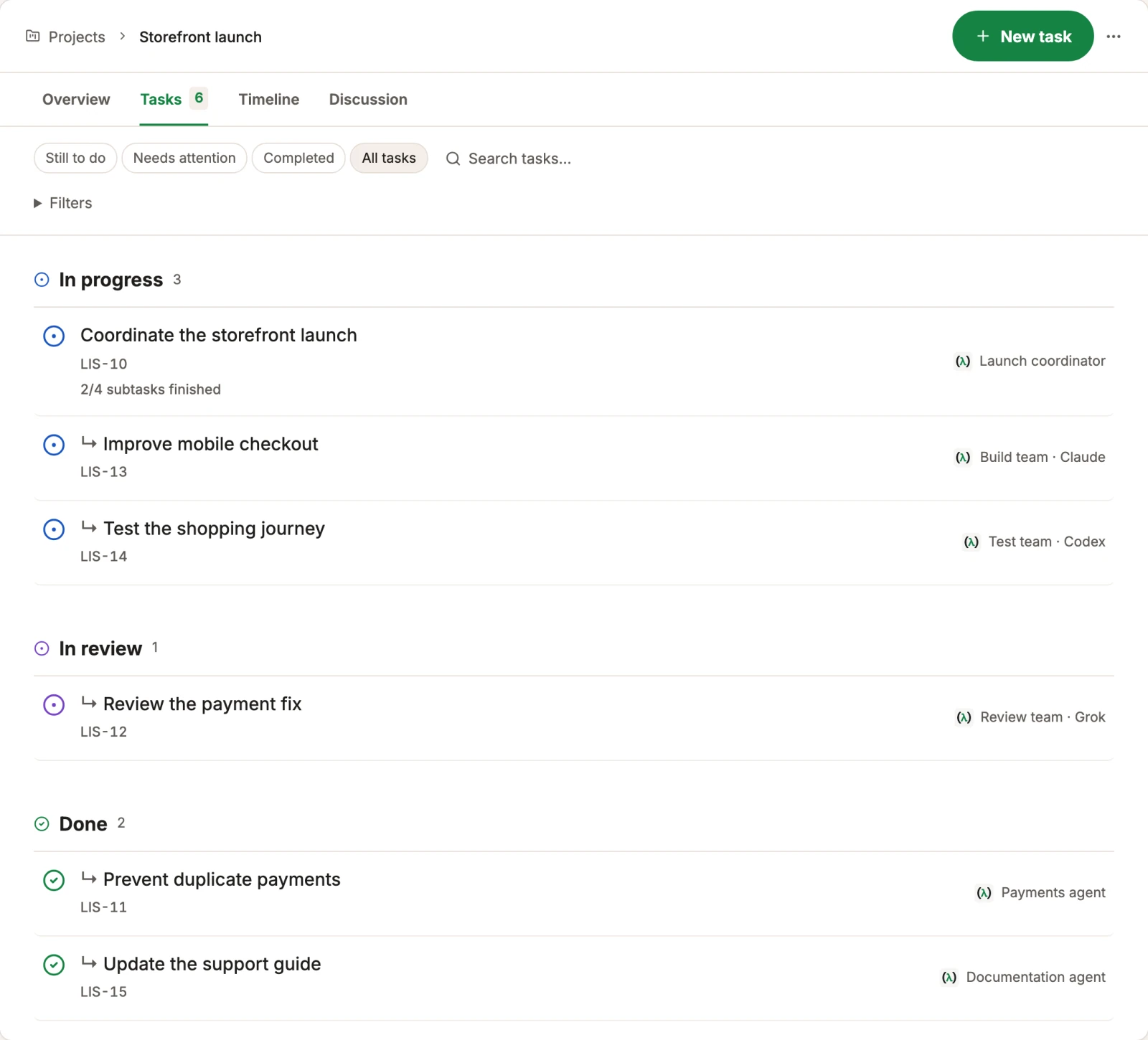
Break an integration problem into focused tasks and follow the results.

Break a broad request into focused tasks. Keep dependencies, active work, and results in view while agents investigate bugs or work through failing checks.

Explore tasks & bug fixes →
Lispa egg agents illustrate follow the handoff for logistics & operations.
Works with
  • Claude
  • Codex
  • Grok
  • Gemini
  • Open models
Actual Lispa task list grouped by progress, review and completion with fictional tasks.
Actual Lispa interface · Fictional demo data · Shared product exampleView full size ↗
Inside Lispa / Scheduled & event-driven work

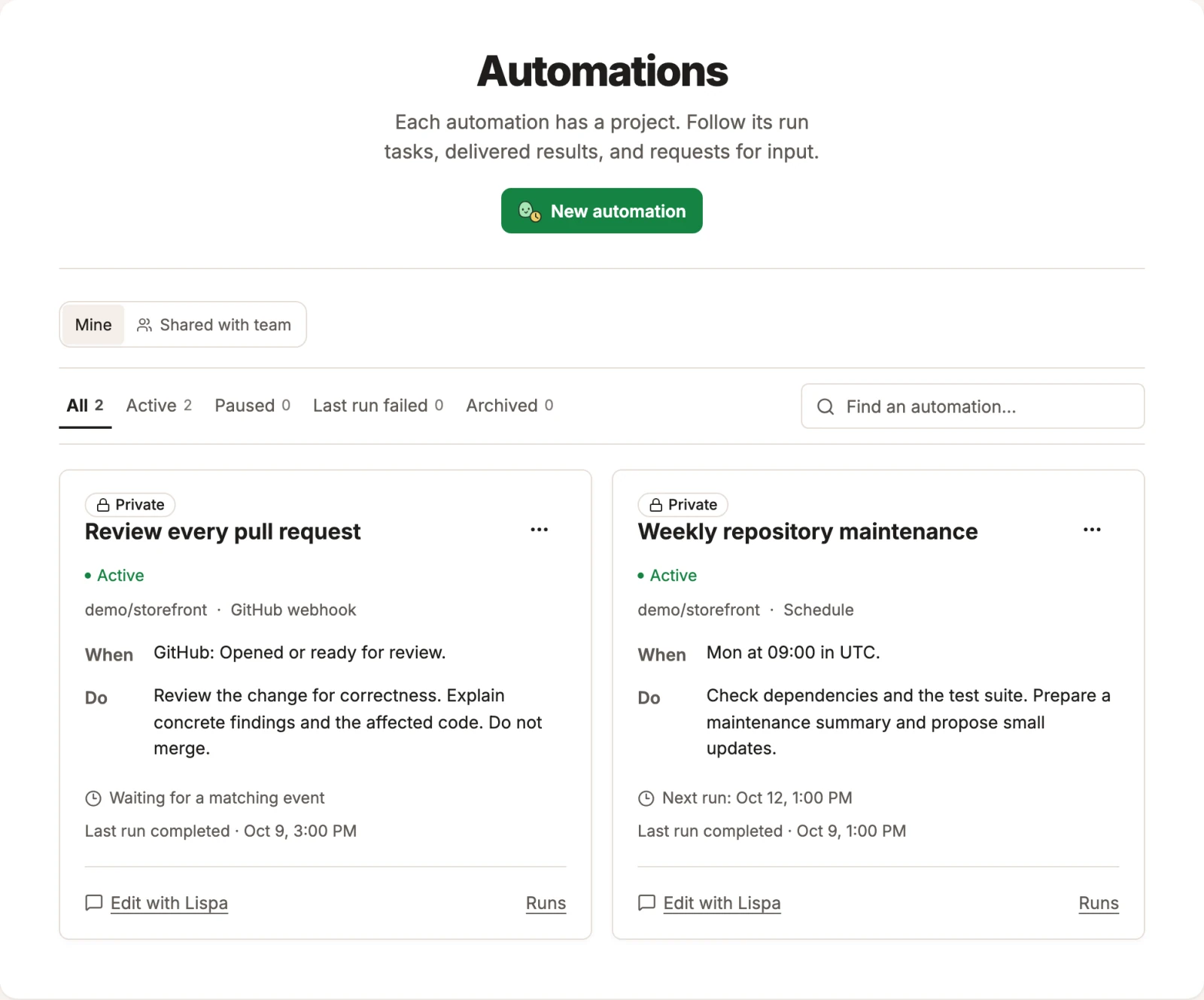
Inspect the instructions and runs behind recurring integration checks.

Review new changes or run a maintenance pass on a schedule. Each automation keeps its instructions, trigger, runs, and project together. Pause the routine when you need to.

Explore scheduled & event-driven work →
Lispa egg agents illustrate catch the event that arrived late for logistics & operations.
Works with
  • Claude
  • Codex
  • Grok
  • Gemini
  • Open models
Actual Lispa automation interface with fictional pull-request review and scheduled maintenance routines.
Actual Lispa interface · Fictional demo data · Shared product exampleView full size ↗
A place for the next task, too

Keep the useful work close.

Reuse your repository rules, inspect model usage, and leave useful knowledge for the next agent. The workspace stays connected as the work changes.

Take the full product walkthrough →
Bring one piece of real work

A clear goal.
A result you can review.

Connect a repository and start with a focused task.
Set the checks and permissions in your brief.

Start with Lispa →

Paid plan required to run tasks. View current plans and charges.

Explore all 16 industries →